TL;DR: Amazon BSR (Best Seller Rank) reflects a product's relative sales performance within its category, not actual unit sales. Understanding how BSR works helps sellers validate demand, analyze competitors, and avoid costly misinterpretations.
Key Takeaways
- Amazon BSR is a relative rank within a category, not a direct measure of units sold.
- BSR is influenced by recent sales velocity, category size, promotions, stock levels, and pricing.
- Estimating sales from BSR requires context, such as category, trend, and benchmarking, not just a calculator.
- Use BSR for product research by analyzing stability, competition, and demand patterns over time.
- Avoid common mistakes like comparing BSR across categories or assuming rank equals profitability.
Table of Contents
- What Amazon BSR Is (And What It Isn't)
- BSR vs. Actual Sales: The Relationship Sellers Misunderstand
- How Amazon BSR Is Calculated (High-Level, Seller-Friendly)
- Interpreting BSR Correctly: 5 Rules That Prevent Bad Decisions
- How to Estimate Sales From BSR (Safely and Realistically)
- Using BSR for Product Research (What It's Good For)
- Using BSR for Competitive Analysis (Beyond "Who's #1")
- Common BSR Scenarios and What They Mean
- BSR vs. Other Metrics (When to Use Which)
- Mistakes Sellers Make With BSR (And How to Avoid Them)
- Mini Walkthrough: Evaluate a Product With BSR in 10 Minutes
- FAQ
- References
Note on marketplaces: This guide is specifically optimized for the US market.
What Amazon BSR Is (And What It Isn't)
Amazon Best Seller Rank (BSR) is one of the most misunderstood metrics in e-commerce. Many sellers assume a lower BSR means more sales; but that's only part of the story. BSR is a dynamic, category-specific ranking that reflects how well a product is selling relative to others in the same category.
BSR = Relative Sales Rank Within a Category
Amazon calculates BSR based on recent sales velocity compared to other products in the same category. A BSR of #1 means the product is currently the top seller in its category.
Myth vs. Fact: BSR ≠ Units Sold
- Myth: BSR tells you how many units a product sells per day.
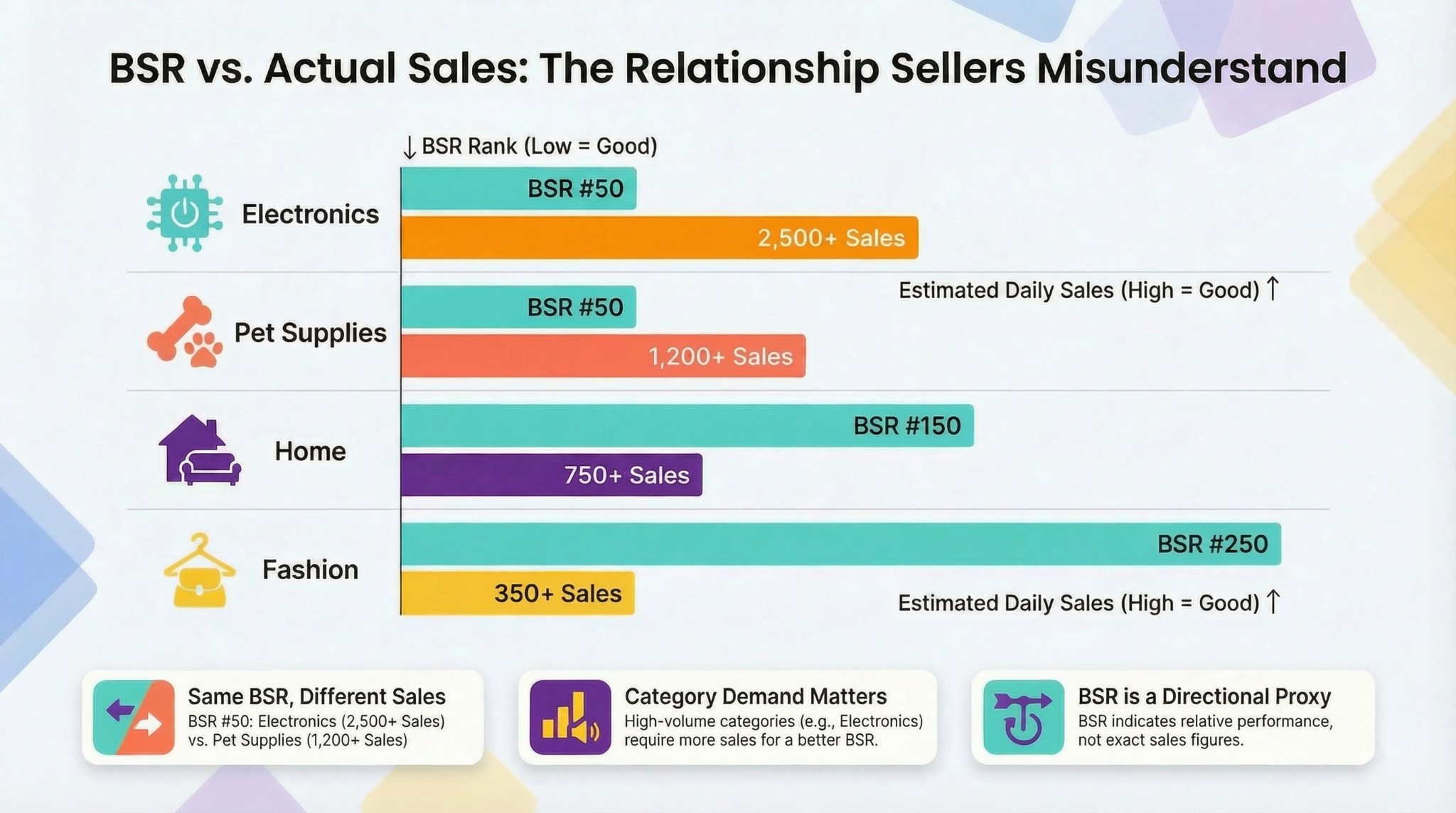
- Fact: Two products with the same BSR can have vastly different sales volumes depending on category demand.
- Myth: A sudden BSR drop means sales crashed.
- Fact: BSR changes can result from competitor promotions, stockouts, or category-wide demand shifts.
Where BSR Appears (And Why It Matters)
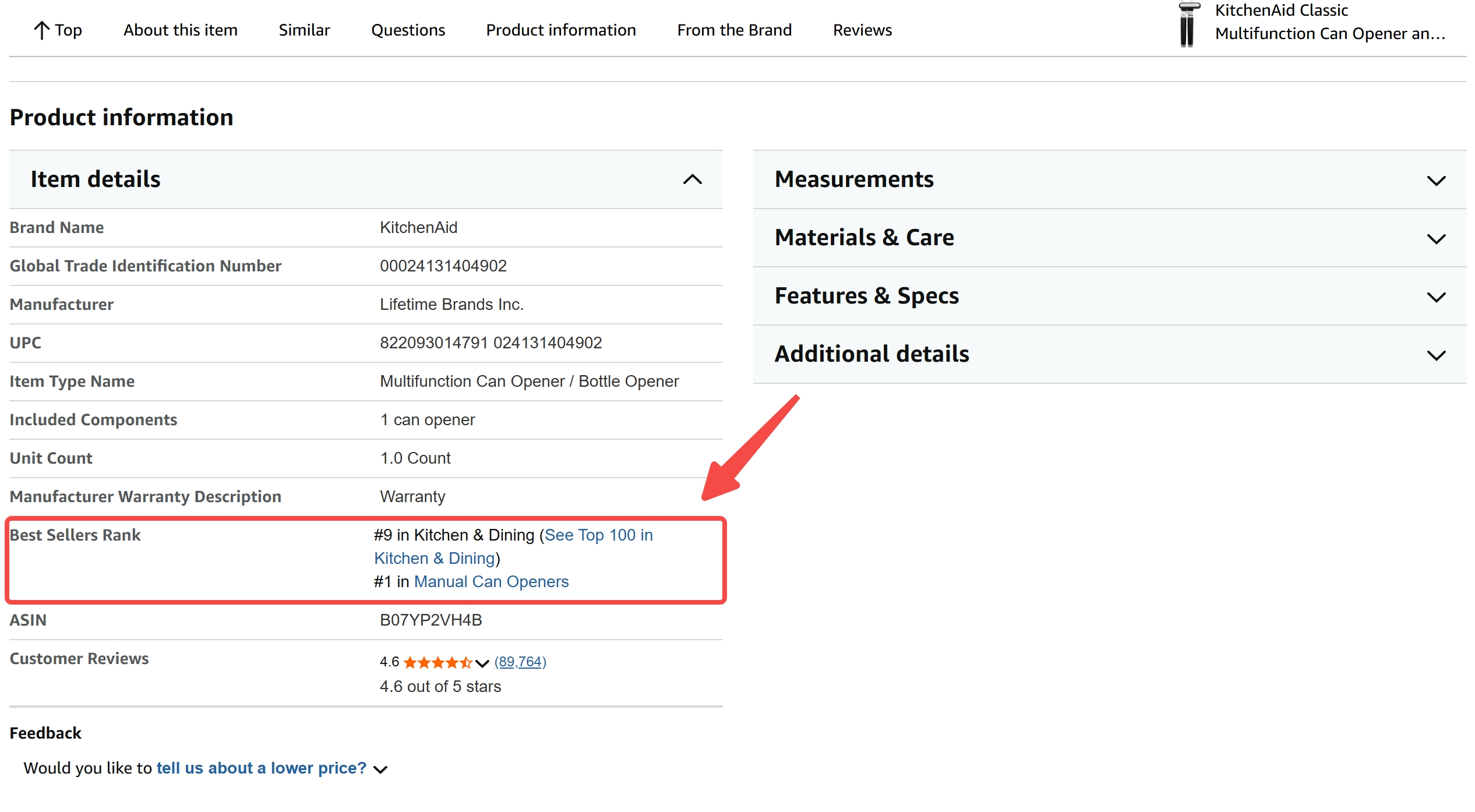
You'll find BSR on every Amazon product page under "Product Details." It typically looks like:
Best Sellers Rank: #42 in Kitchen & Dining (See Top 100 in Kitchen & Dining)
This tells you two things: the product's rank in its primary category and a link to explore top performers. For sellers, this visibility helps assess competitive positioning and demand trends at a glance.
BSR vs. Actual Sales: The Relationship Sellers Misunderstand
One of the biggest misconceptions is equating BSR with actual sales. While BSR is driven by sales, it doesn't report them. Instead, it's a proxy for demand intensity within a specific context.
Why Two Products Can Have Similar Sales But Different BSR
Imagine two products each selling 50 units per day:
- Product A: In a niche category with only 500 daily sales total.
- Product B: In a high-volume category with 50,000 daily sales.
Even with identical unit sales, Product A will likely have a much better (lower) BSR because it captures a larger share of its category's demand.
Why the Same BSR Can Mean Different Sales in Different Categories
Category Demand Level
A BSR of #100 in Electronics might represent 300+ daily sales due to massive category volume. The same BSR in Pet Supplies might reflect only 10-20 units.
Category Structure and Subcategories
Amazon's category hierarchy affects BSR interpretation. A product ranked #50 in Home > Furniture > Office Chairs competes in a narrower pool than one in Home > Furniture. Always check the full category path.
The Correct Takeaway: BSR Is a Directional Demand Proxy
Think of BSR as a weather vane, not a thermometer. It shows the direction of demand, not the exact temperature. Use it to spot trends, validate niches, and monitor competition, but never as a standalone sales report.
How Amazon BSR Is Calculated (High-Level, Seller-Friendly)
Amazon doesn't publish the exact BSR algorithm, but based on observable behavior and seller data, we know it's primarily driven by recent sales velocity relative to peers in the same category.
The Core Idea: Recent Sales Velocity + Category Comparison
BSR weighs recent sales more heavily than older ones. A product that sold 10 units yesterday will see a bigger BSR impact than one that sold 50 units a week ago. This makes BSR responsive to real-time demand changes.
Why BSR Updates Frequently (And Why It Can Look "Jumpy")
BSR updates multiple times per day, sometimes hourly. This frequency causes "jumpy" behavior, especially for low-volume listings. A single sale can dramatically improve BSR when baseline velocity is low.
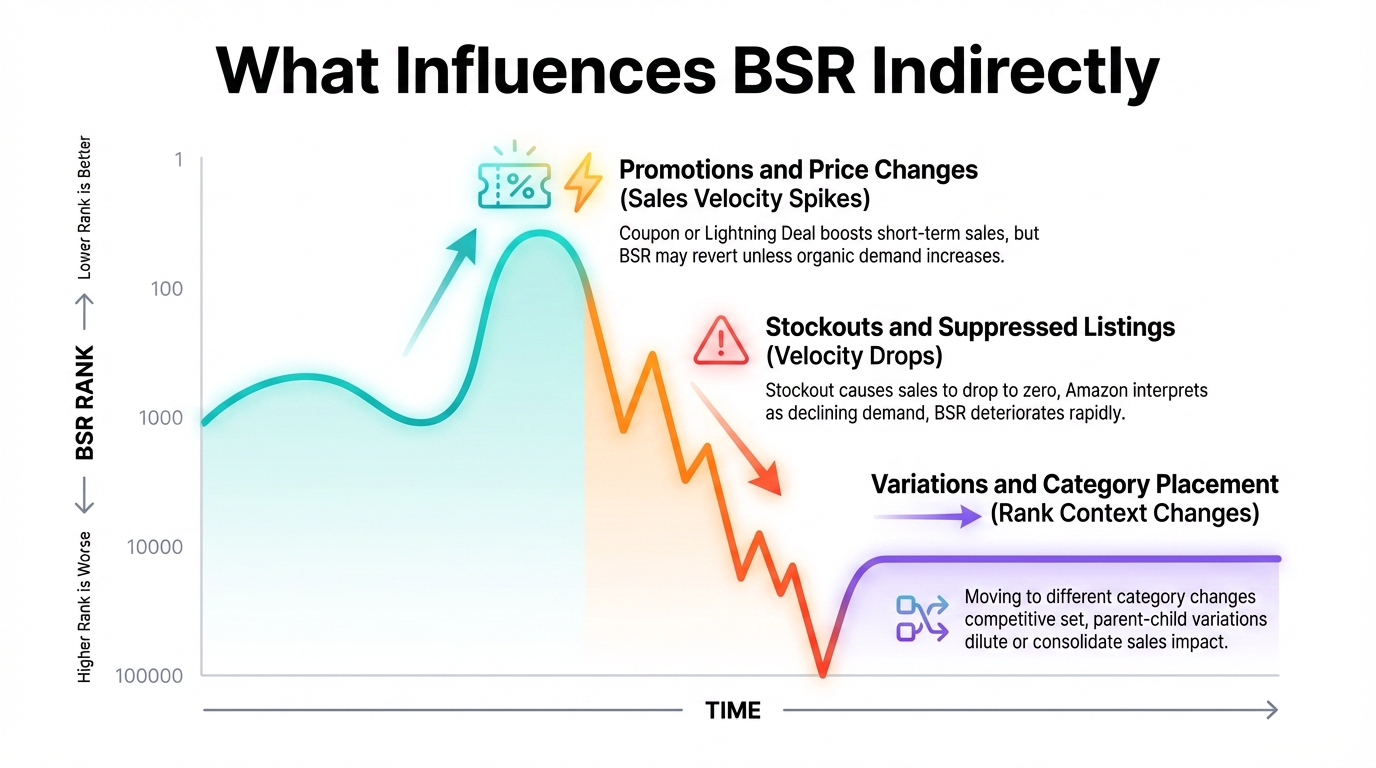
What Influences BSR Indirectly
Promotions and Price Changes (Sales Velocity Spikes)
Running a coupon or Lightning Deal boosts short-term sales, improving BSR. But once the promo ends, BSR may revert unless organic demand increases.
Stockouts and Suppressed Listings (Velocity Drops)
If you run out of stock, your sales drop to zero. Amazon interprets this as declining demand, causing BSR to deteriorate rapidly; even if your product was previously strong.
Variations and Category Placement (Rank Context Changes)
Moving a product to a different category changes its competitive set, altering BSR. Similarly, parent-child variation structures can dilute or consolidate sales impact across SKUs.
BSR Drivers Checklist: What to Check When BSR Changes
- Recent promotions or discounts?
- Price increased or decreased?
- Stock level dropped or listing suppressed?
- Competitor launched a deal?
- Category placement changed?
- PPC campaigns paused or scaled?
Interpreting BSR Correctly: 5 Rules That Prevent Bad Decisions
Misreading BSR leads to poor product picks, wasted ad spend, and panic over normal fluctuations. Follow these rules to use BSR wisely.
Always Interpret BSR Within the Same Category
A BSR of #1,000 in Books is excellent. The same rank in Home & Kitchen is mediocre. Always compare apples to apples.
Use Ranges, Not Single Snapshots (Trend > Point-in-Time)
Check BSR over 7-30 days. A product fluctuating between #200-#400 is more stable than one jumping from #150 to #800.
Watch for Seasonality (BSR Improves in Peak Demand Without You "Winning")
Grills see better BSR in summer. Holiday decor spikes in Q4. Don't mistake seasonal lifts for product strength.
Understand Ad-Driven Sales vs. Organic Sales (Both Move BSR)
If your BSR improves only when running ads, the demand may not be organic. Track BSR alongside ad spend to assess true health.
BSR Can Be "Healthy" While Profit Is Not (Ads Can Fake Velocity)
You can achieve a great BSR by selling at a loss via heavy discounts and ads. But if CAC (Customer Acquisition Cost) exceeds LTV (Life Time Value), it's unsustainable. Always pair BSR with profitability metrics.
How to Estimate Sales From BSR (Safely and Realistically)
Many sellers search for an "Amazon BSR calculator," hoping for a precise sales number. But no tool can deliver accuracy without context.
Why Any BSR-to-Sales Estimate Is an Approximation
Simple formulas fail because:
- Different categories have vastly different sales densities.
- Time windows (daily vs. weekly sales) affect velocity.
- New vs. established products behave differently.
A Practical Estimation Method Sellers Can Use
Step 1: Lock Category + Subcategory
Identify the exact category path. Open your target product page on Amazon and confirm its hierarchy.
Step 2: Compare Multiple Known Listings (Benchmark Approach)
Find 3-5 products in the same subcategory with known sales (via tools or estimates). Plot their BSR vs. estimated volume to create a rough curve.
Step 3: Use BSR Trend + Review Velocity + Price Band to Sanity-Check
A product gaining 10 reviews/week at $25 price point with stable BSR around #300 likely sells 30-50 units/week.
Estimation Guardrails: When BSR Calculators Help (And When They Mislead)
- Helpful: For relative comparisons in the same niche.
- Misleading: When applied across categories or without trend data.
- Never trust: Tools claiming exact daily sales from BSR alone.
Using BSR for Product Research (What It's Good For)
BSR is most powerful when used early in product selection to validate demand and competition.
Demand Validation: Does the Niche Have Steady Buyers?
Consistently low BSR (e.g., <1,000) across top products indicates healthy demand. Avoid niches where even leaders have BSR >10,000.
Competition Proxy: How Many Sellers Have Strong, Stable BSR?
If the top 10 listings have BSR <200 and stable history, competition is fierce. If ranks fluctuate widely, there's opportunity.
Spotting Winners vs. Flukes
Stable BSR Pattern = Evergreen Demand
Products maintaining BSR #100-#300 for months indicate consistent buyer interest.
Spike Pattern = Promo/Viral/Seasonal Effect
A product jumping from #5,000 to #50 then falling back likely had a temporary boost, not sustainable demand.
Using BSR for Competitive Analysis (Beyond "Who's #1")
BSR history reveals competitor strategies and vulnerabilities.
Build a Competitor Set (Top 10-20 Listings)
Use SellerSprite's Market Research Tool to identify key players in your niche.
Track BSR History (Daily/Weekly) and Interpret Movements
Identify Promos (Sudden Sharp Improvements)
A competitor's BSR jumping from #800 to #200 overnight? Likely running a deal.
Identify Stockouts (Rank Deteriorates + Availability Issues)
Watch for BSR decline paired with "Currently unavailable" or low stock messages.
Pair BSR With Other Signals (Price, Reviews, Ad Density)
Combine BSR trends with price tracking and ad monitoring to build a full competitive picture.
Common BSR Scenarios and What They Mean
Troubleshooting Table: If X Happens → Check Y
| Scenario | Check This |
|---|---|
| BSR improves but sessions don't | Category-wide demand increase or competitor stockout |
| BSR worsens after price increase | Conversion rate drop due to price sensitivity |
| BSR swings wildly on new listing | Low baseline; each sale causes big % change |
| BSR flat but sales rising | Category also growing; rank "ceiling" effect |
BSR vs. Other Metrics (When to Use Which)
BSR vs. Sessions/Units (Business Reports)
BSR shows relative performance; Business Reports show absolute numbers. Use both: BSR for context, reports for truth.
BSR vs. Keyword Rank (SEO Visibility vs. Sales Velocity)
High keyword rank means visibility. High BSR means conversions. A product can rank #1 for keywords but have poor BSR if it doesn't convert.
BSR vs. PPC Metrics (ACoS/TACoS: Profit Lens)
BSR doesn't care about cost. PPC metrics do. A great BSR with 80% ACoS is a money loser.
Mistakes Sellers Make With BSR (And How to Avoid Them)
Assuming BSR Equals Daily Sales
Never assume a BSR of #100 = X units sold. Use benchmarking and trends instead.
Comparing BSR Across Categories
A #500 BSR in Toys ≠ #500 in Tools. Always contextualize.
Overreacting to Short-Term Fluctuations
One-day drops are normal. Focus on 7-day averages.
Using BSR Alone to Pick a Product
Combine BSR with margin analysis, PPC feasibility, and review velocity before launching.
Mini Walkthrough: Evaluate a Product With BSR in 10 Minutes
10-Minute BSR Evaluation SOP
- Capture category + current BSR – Note full path and rank.
- Check BSR history pattern – Stable or spiky? Use a tracker.
- Benchmark top competitors – Are they consistent performers?
- Make the call – Proceed, watchlist, or reject based on stability and competition.
Capture Category + Current BSR
Go to the product page. Write down the BSR and full category path.
Check BSR History Pattern (Stable vs. Spiky)
Use a tool like SellerSprite to view 30-day BSR history. Look for consistency.
Benchmark Top Competitors in the Same Subcategory
Compare 5-10 top listings. Are they all stable? Or do ranks fluctuate?
Make the Call: Proceed / Watchlist / Reject
If BSR is stable, competition is manageable, and demand is consistent, proceed. Otherwise, watchlist or reject.
FAQ
What does BSR mean on Amazon and how is it calculated?
BSR stands for Best Seller Rank. It's Amazon's way of ranking products by sales performance within a specific category. It's calculated using recent sales velocity compared to other products in the same category. The exact formula is proprietary, but it heavily weights recent sales and adjusts dynamically.
How often is Amazon BSR updated for products?
Amazon updates BSR multiple times per day, often every hour. This frequent update cycle makes BSR responsive to real-time sales changes but can also cause short-term volatility, especially for low-volume products.
Why did my BSR change but my sales didn't?
BSR is relative. If your sales stayed the same but competitors sold more (or ran promos), your BSR would drop. Conversely, if competitors had stockouts, your BSR could improve even without increased sales.
What's a "good" BSR in my category?
A "good" BSR depends on your category. In high-volume categories like Electronics, sub-1,000 is strong. In niche categories, even #5,000 might be acceptable. Compare to top sellers in your specific subcategory for context.
Can improving my Amazon BSR help increase my sales?
Yes, indirectly. A better BSR improves visibility in "Best Sellers" lists and can boost organic traffic. However, BSR is an outcome of sales, not a direct lever. Focus on conversion rate, pricing, and marketing to drive sales and, in turn, improve BSR.
Next Steps
- Use SellerSprite's Product Research Tool to analyze BSR trends and competitor history.
- Bookmark the Amazon Product Research Guide for advanced sourcing strategies.
References
By SellerSprite Success Team
The SellerSprite Success Team combines hands-on Amazon selling experience with data science expertise. We've helped thousands of sellers optimize product research, track BSR trends, and scale profitably using real-time analytics and AI-powered insights.