TL;DR: Share of search measures your brand's visibility in Amazon search results compared to competitors. It's a critical KPI for Amazon sellers to assess organic and paid performance and optimize product discoverability.
Key Takeaways
- Share of search reflects how often your products appear in Amazon search results relative to competitors for targeted keywords.
- It includes both organic and paid visibility, making it essential for holistic Amazon SEO and PPC strategy.
- Tracking share of search helps identify keyword gaps, optimize ad spend, and improve long-term brand dominance on Amazon.
Table of Contents
Note on marketplaces: This guide is specifically optimized for the US market.
What Is Share of Search?
Share of search (SoS) is a performance metric that shows the percentage of times your product appears in Amazon search results for a set of relevant keywords, compared to all competing listings. It's a powerful indicator of your brand's visibility and market presence on Amazon.
Unlike simple sales or traffic metrics, share of search focuses on discoverability: how often shoppers see your product when searching for specific terms. This includes both organic rankings and paid ad placements. For example, if customers search for "wireless earbuds" 10,000 times per month and your product appears in 2,500 of those sessions, your share of search is 25%.
This metric is especially valuable for growth-focused Amazon sellers because it reveals how well you're capturing attention before the purchase decision is made. A high share of search often correlates with stronger conversion potential and long-term market leadership.
Why Share of Search Matters for Amazon Sellers
For Amazon sellers, especially brand owners, marketing managers, and scaling businesses, share of search is more than just a vanity metric. It's a leading indicator of competitive strength and future sales growth.
Consider this: two brands may have similar monthly sales, but one has a 40% share of search while the other has only 15%. The higher-visibility brand is likely to grow faster because it's consistently seen by more shoppers. Over time, this visibility compounds into greater brand recognition, higher conversion rates, and stronger pricing power.
Additionally, share of search helps you benchmark against competitors. If your main rival dominates top keywords in your niche, you can use SoS data to prioritize which terms to target through SEO, content optimization, or paid ads. It also supports strategic decisions like entering new categories or launching competitive pricing campaigns.
Whether you're a new seller trying to gain traction or a large brand defending market share, tracking your Amazon share of search gives you an edge in understanding real-time market dynamics. To dive deeper into Amazon analytics fundamentals, check out our comprehensive Amazon Seller Analytics Guide.
Organic vs. Paid Search Share: A Strategic Breakdown
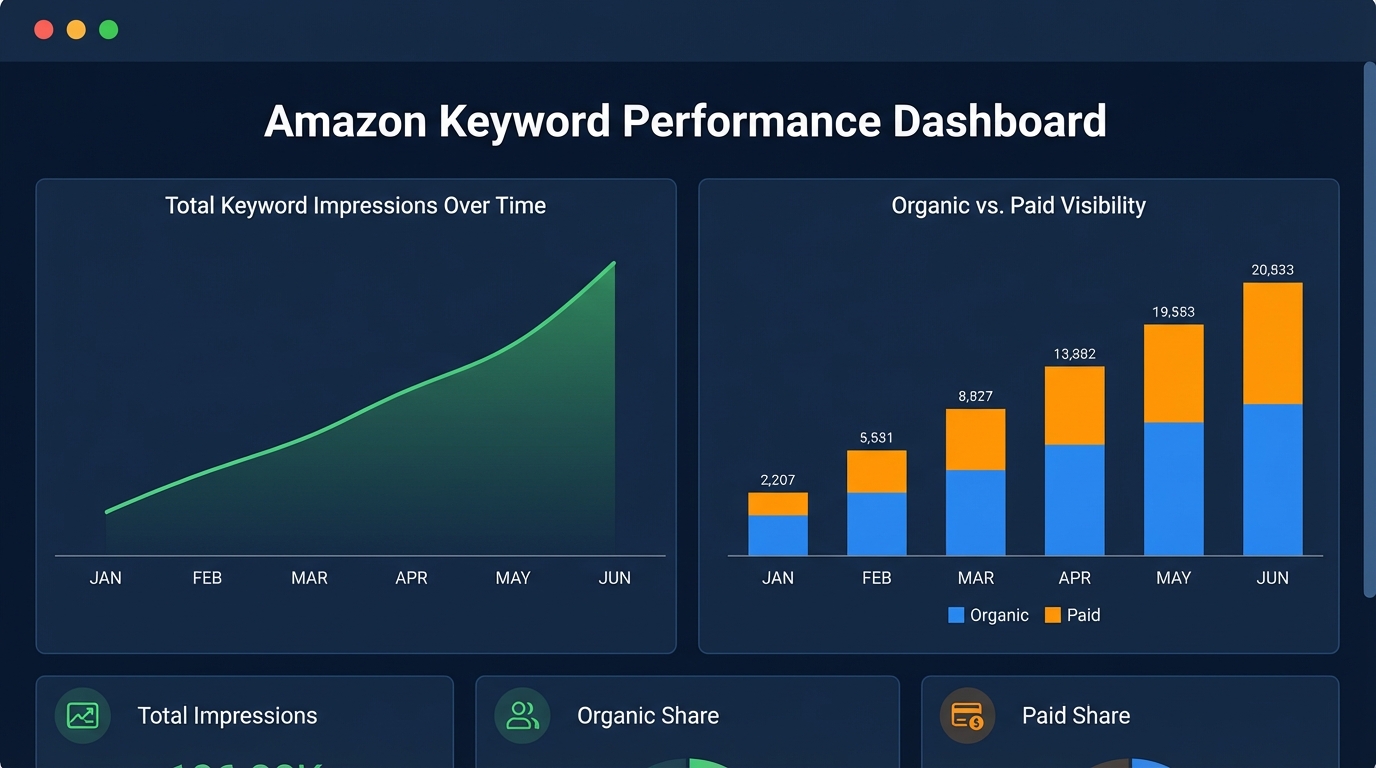
Your total share of search consists of two components: organic search share and paid search share. Understanding the balance between them is key to building a sustainable Amazon growth strategy.
Organic Search Share
This refers to how often your product appears in natural (non-paid) search results for target keywords. High organic share indicates strong product listings, effective keyword optimization, and solid customer engagement signals like reviews and conversion rates.
Improving organic visibility requires optimizing titles, bullet points, backend keywords, and A+ content using high-intent search terms. It also involves earning positive reviews and maintaining competitive pricing. While it takes time, organic dominance delivers long-term, cost-efficient traffic.
Paid Search Share
Paid search share measures how frequently your ads appear in sponsored placements. This is influenced by your Amazon PPC campaigns, bid strategies, keyword targeting, and ad relevance.
While paid visibility can be boosted quickly with budget increases, it's not sustainable without ROI discipline. Smart sellers use paid search to fill visibility gaps while building organic strength. For best practices, see our Amazon Advertising Guide and learn how to structure profitable campaigns.
The ideal scenario? A balanced mix where organic share grows steadily, reducing reliance on paid ads, while paid efforts protect top positions during promotions or competitive spikes.
How to Measure Your Amazon Share of Search
Amazon does not provide a native "share of search" metric in Seller Central. However, third-party tools like SellerSprite enable you to calculate and track this KPI using search impression share data.
Here's how to measure it step-by-step:
Step 1: Identify Target Keywords
Use keyword research tools to compile a list of high-volume, relevant search terms for your product category. Focus on buyer-intent keywords (e.g., "noise cancelling headphones for travel").
Step 2: Track Search Impression Share (SIS)
Search Impression Share is the percentage of times your product was shown when a keyword was searched. Tools like SellerSprite aggregate this data across multiple keywords to calculate your overall share of search.
Step 3: Segment by Organic and Paid
Break down your impression share into organic and sponsored results. This reveals where your visibility comes from and where investment is needed.
Step 4: Benchmark Against Competitors
Compare your share of search with top competitors. Are they dominating certain keywords? Are there underserved terms you can exploit? Use competitive intelligence dashboards to gain insights.
For advanced analysis, explore the Search Query Performance Dashboard in SellerSprite, which provides granular visibility into keyword-level performance and competitor overlap.
How to Increase Your Share of Search on Amazon
Growing your share of search requires a dual approach: strengthening organic visibility and optimizing paid campaigns. Here are proven strategies:
1. Optimize Product Listings for High-Intent Keywords
Ensure your title, bullet points, description, and backend search terms include relevant, high-traffic keywords. Use tools to analyze keyword relevance and search volume. Avoid keyword stuffing and focus on natural integration that improves readability and conversion.
2. Leverage Amazon PPC Strategically
Run targeted Sponsored Products, Brands, and Display campaigns. Focus on top-performing keywords and use negative keywords to reduce wasted spend. Learn more in our Negative Keywords Guide.
3. Monitor Keyword Volatility and Adjust Quickly
Keyword rankings fluctuate daily due to competition, seasonality, and algorithm updates. Use real-time monitoring tools to detect drops in visibility and respond with bid adjustments or content updates. Read our guide on Keyword Volatility to stay ahead.
4. Analyze Competitor Gaps
Identify keywords where competitors have high impression share but weak conversion metrics. These are opportunities to outperform them with better content, pricing, or ad targeting.
5. Invest in Brand Building
Strong brands naturally earn higher search visibility. Use A+ Content, Amazon Posts, and external marketing to build recognition. Over time, Amazon's algorithm rewards trusted brands with better organic rankings.
FAQ
What is share of search and why is it important for Amazon sellers?
Share of search measures how often your product appears in Amazon search results for relevant keywords compared to competitors. It's important because it reflects your brand's visibility and market presence. A higher share means more shoppers see your product, increasing the likelihood of clicks, conversions, and long-term growth. It helps sellers benchmark performance, identify gaps, and optimize both organic and paid strategies.
How can I increase my share of search on Amazon?
To increase your share of search, optimize product listings with high-intent keywords, run strategic Amazon PPC campaigns, monitor keyword volatility, and analyze competitor weaknesses. Improve organic visibility through A+ content, reviews, and pricing, while using paid ads to capture immediate traffic. Regularly track impression share and adjust based on performance data.
What tools can I use to track share of search for my Amazon products?
You can use advanced Amazon analytics platforms like SellerSprite to track share of search. These tools aggregate search impression share data across organic and paid results, break down performance by keyword, and allow benchmarking against competitors. Since Amazon doesn't provide this metric natively in Seller Central, third-party solutions are essential for accurate measurement and actionable insights.
Next Steps
- Start tracking your Amazon share of search using SellerSprite to gain real-time visibility insights.
- Review your current keyword strategy and identify gaps in organic and paid impression share.
References
- Amazon Seller Analytics Guide View
- Search Query Performance Dashboard: A Deep Dive View
- Keyword Volatility: Why Rankings Dance and How to React View
- Amazon Advertising Guide: How to Use Amazon PPC to Boost Your Sales View
By SellerSprite Team
The SellerSprite Team combines deep expertise in Amazon marketplace analytics, e-commerce SEO, and data-driven advertising. With years of experience helping thousands of sellers optimize their operations, we provide actionable insights grounded in real-world performance data and industry best practices.